

Marketing Tips
Geofencing Marketing: What It Costs and When It Actually Works
How the targeting really works, what you should expect to pay, and the honest answer on whether it suits your business.
The short answer:
Geofencing marketing draws a virtual boundary around a physical location and shows ads to phones that enter it. Costs run from about $500 a month running it yourself inside Google or Meta, up to $15,000 or more for enterprise programmatic campaigns. It works well for events, competitor locations and dense high-footfall areas. For most small local businesses, the same budget spent on Google Business Profile work and local search returns more.
That last sentence is the one you’ll rarely hear from someone selling geofencing, so it’s worth saying up front.
Geofencing is real, it works, and it’s genuinely useful in specific situations. It’s also sold hard to businesses it doesn’t suit, at prices that don’t match what the platforms actually charge. This is the version written by people who run local campaigns rather than people selling the software.
One quick note before we start, because the acronym confusion is real. GEO in a marketing conversation increasingly means generative engine optimization, which is about getting quoted by AI. That is a completely different subject, covered in our AI SEO strategy playbook. This article is about geofencing, the location one.
What geofencing marketing actually is
A geofence is a virtual boundary drawn around a real place. When a phone crosses that boundary, it becomes eligible to see your ads.
That’s the whole idea. The technology underneath uses GPS, Wi-Fi, cellular signal and sometimes Bluetooth to work out roughly where a device is, then checks whether it has crossed a line you drew on a map.
It’s worth being precise about what it is and isn’t, because the marketing around it can sound alarming.
- It is ad targeting, not tracking. You’re not following individuals around. You’re telling an ad platform to include or exclude an audience based on where devices have been.
- It is not instant. The image of a phone buzzing with an offer the moment someone walks past is mostly marketing fiction. In practice ads are served later, while the person browses or scrolls.
- It is not new. Radius targeting has been built into Google Ads and Meta for years. What vendors sell as geofencing is usually a more precise version of something you already have access to.
- It works on a delay you don’t control. Some platforms can target a device for days or weeks after it visited a location, which is useful and also the part people find uncomfortable.
Geofencing versus geotargeting
These get used interchangeably and they aren’t the same. Geotargeting means showing ads to people in a broad area, usually a city, postcode or radius. Geofencing means drawing a tight boundary around a specific place, sometimes a single building.
Geotargeting is what you get free inside Google Ads and Meta. Geofencing at the building level is usually what you’re paying a specialist vendor for.
How accurate is geofencing, really?
Accuracy is where the sales pitch and the reality separate, so this is worth understanding before you spend anything.
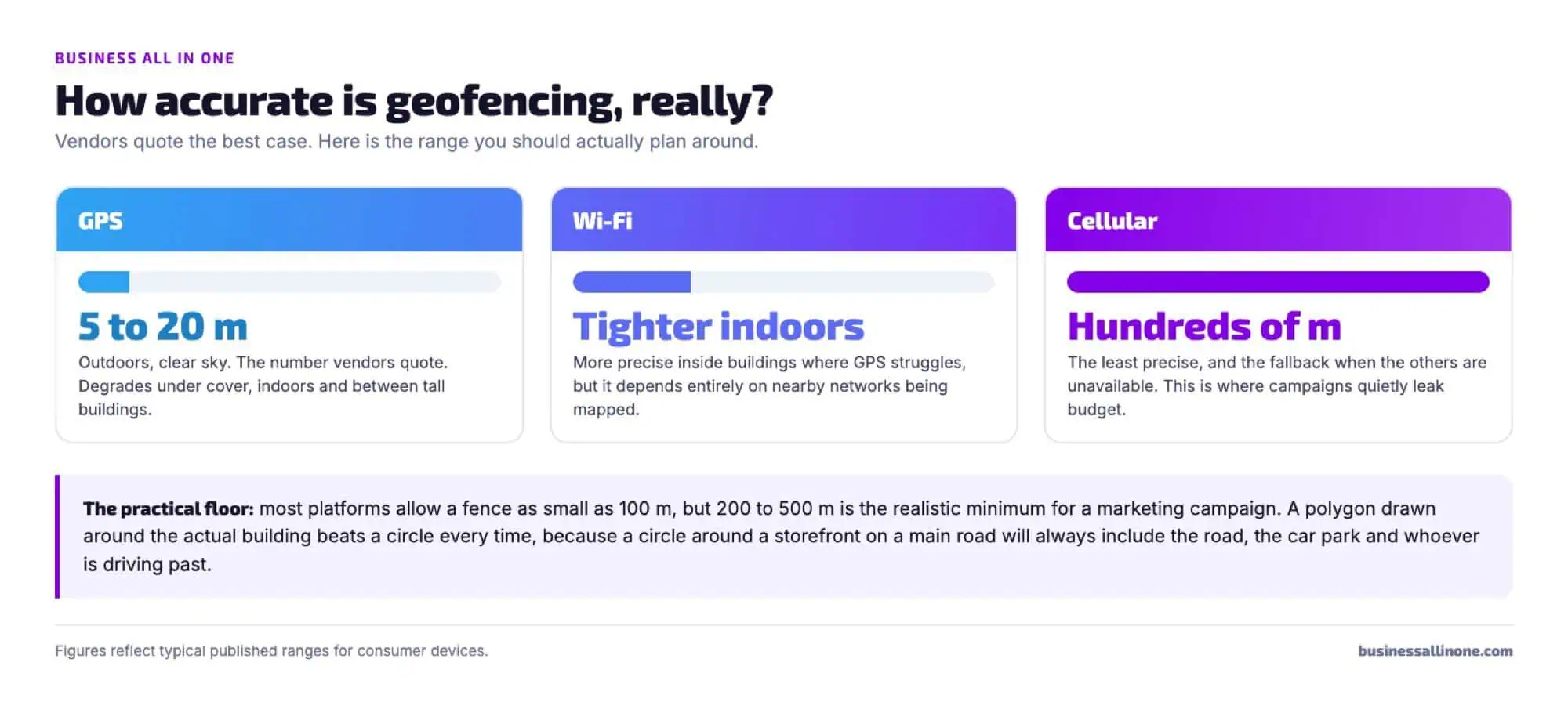
The number you’ll be quoted is the GPS one, because it’s the flattering one. In the real world a device switches between signals constantly, and the fence you drew is only as tight as whatever signal is available at that moment.
What this means practically: a circle drawn around a storefront on a main road will include the road. It will include the car park, the bus stop, the flats above the shop next door, and everybody driving past at forty miles an hour who will never stop.
You pay for those impressions. This is the single biggest reason geofencing campaigns underperform their projections, and it’s rarely mentioned before the contract is signed.
Two things reduce the waste. Draw polygons around the actual building footprint rather than circles. And set the fence larger than feels right, then exclude, rather than drawing something tiny that misses genuine visitors because their phone was on cellular that day.
What geofencing marketing costs
Published pricing on this is vague to the point of unhelpful, so here are the actual tiers.
| Approach | Typical monthly cost | What you get | Best for |
|---|---|---|---|
| Do it yourself | Ad spend only, from about $500 | Radius and location targeting inside Google Ads and Meta, included at no extra charge | Almost every small local business starting out |
| Managed by an agency | $1,500 to $5,000 including spend | Someone building the fences, writing the ads and reading the data, usually still inside the main platforms | Businesses with a real budget and no time |
| Programmatic vendor | $15,000+ | Building-level polygons, historical location data, cross-app inventory, device-level retargeting | Multi-location brands, events, large campaigns |
Most vendors price on CPM, meaning you pay per thousand impressions rather than per click. Geofencing CPMs typically run higher than standard display because you’re buying a narrow audience.
The part worth knowing:
Location targeting is already built into Google Ads and Meta at no additional cost. If someone quotes you a monthly fee for geofencing, ask specifically what it does that a radius in Google Ads does not. There is sometimes a genuine answer, usually involving building-level polygons or historical visitor data. Frequently the answer is that you’re paying for a dashboard.
Ask three questions before you sign anything. How much of this is platform spend and how much is fee. Can I see the polygon boundaries you’re drawing. And how will you attribute a walk-in to an ad impression, given nobody clicks anything.
That last question is the one that separates serious vendors from the rest.
How to set up a campaign
If you decide it fits, the sequence below is the one that avoids the common mistakes. It applies whether you run it yourself or brief someone else.
Pick the place, not the area
Name the specific location and why people there are worth reaching. A competitor gym, a trade show hall, a shopping centre. If you cannot name it, stop here and use radius targeting instead. The whole value is in the precision.
Draw the boundary properly
Use a polygon around the building footprint wherever the platform allows it. If you only have circles, size for the wider signal range and then exclude the obvious waste, such as the motorway running past the back of the site.
Write an ad that makes sense there
The person seeing it was recently somewhere specific. An ad that ignores that context wastes the targeting entirely. This is where most campaigns fall down, because the creative is the same one running everywhere else.
Decide how you will prove it worked
Before launch, not after. A dedicated landing page, a call tracking number, a promo code, or a genuine walk-in count compared to the weeks before. Agree this with your vendor in writing.
One practical note on timing. If you are fencing an event, the window matters more than the boundary. A two-day conference is worth targeting for the two days and the fortnight afterwards, because the decision usually happens once people are home.
What our clients say
Trusted by small businesses




When geofencing works, and when it doesn’t
This is the section most guides skip, because the honest answer costs somebody a sale.
Where it genuinely works
- Events and conferences. A trade show, a stadium, a festival. A dense, temporary crowd of people who share an interest, in a defined space, for a defined window. This is geofencing at its best.
- Competitor conquesting. Fencing a competitor’s location and advertising to people who visit it. Effective for considered-but-switchable purchases like gyms, dealerships and phone stores.
- High footfall in a dense area. A cafe on a busy high street, a retailer in a shopping centre. Enough people pass within a tight boundary for the numbers to work.
- Multi-location businesses. When you’re running the same play across twenty sites, the setup cost amortises and the data becomes genuinely useful.
- Recruitment. Fencing job fairs or competitor sites to reach people who might move. Often more effective than the marketing use.
Where it disappoints
- Rural and low-density areas. Not enough devices cross the fence to generate meaningful volume. You’ll pay minimums for impressions that never arrive.
- Emergency and urgent services. Nobody standing near your competitor’s shop is thinking about the plumber they’ll need next March. Urgent trades are won in search, at the moment of need.
- Considered, infrequent purchases. Roofing, legal work, dental implants. Physical proximity tells you almost nothing about whether somebody is in market.
- Thin margins. If a customer is worth $60, a campaign with a $15 CPM and a low conversion rate will not pay for itself.
- Businesses without the basics. If your Google Business Profile is half finished, geofencing is the wrong purchase. Fix the free thing first.
Read those lists honestly against your own business. Most local service businesses fall in the second list, and that is not a criticism of geofencing. It’s a mismatch between a tool and a job.
A worked example: the same $2,000
Abstract comparisons are hard to act on, so here is one month of budget spent two ways for a hypothetical cafe on a busy high street.
Option one, geofencing. A fence around the office block opposite and the station two streets away. At a $15 CPM, $2,000 buys roughly 133,000 impressions. Assume a generous 0.3% of those people act at some point, and you are hoping for around 400 responses spread over weeks, with no click to trace and no way to separate them from people who would have walked in anyway.
Option two, local search. The same $2,000 covers a month of Google Business Profile work, review generation, a handful of answer pages and some paid search on high-intent terms. Every inquiry arrives with a source attached. The profile work keeps producing after the month ends, which the impressions do not.
For a cafe with genuine footfall, option one can win, because proximity really does predict a coffee. For a plumber, a dentist or a roofer, option two wins almost every time, because nobody chooses a roofer based on which building they walked past.
That is the whole decision in one comparison. It is not that geofencing does not work. It is that proximity has to actually predict purchase for your business, and for most local service trades it does not.
What we’ve seen running local campaigns
We’ve been running marketing for trades, home services and local practices since 2017. A few patterns have been consistent.
Most inquiries about geofencing come after a sales call, not a business problem. Somebody phoned, the pitch was good, and the owner wants to know if it’s worth it. That’s a different conversation from a business that identified a targeting problem and went looking for a solution.
The businesses it suits already know who they want to reach. When an owner can name the specific building, event or competitor, geofencing usually has a job to do. When the answer is “people near me”, radius targeting inside Google Ads does the same thing for the cost of the clicks.
Attribution is the recurring disappointment. Somebody sees an ad on Tuesday and walks in on Saturday. There’s no click. Vendors report impressions and foot traffic lift modelled from their own data, which is not the same as a booked job. Businesses used to counting calls find this frustrating, and they’re right to.
The comparison that keeps coming up. When we’ve put the same monthly budget against Google Business Profile work, review generation and local search instead, it has produced more traceable inquiries for the local service businesses we work with. That’s our experience with our client base, not a universal law, and it wouldn’t hold for a retailer in a shopping centre.
Our cleaning company case study documents what that alternative looked like in practice, including the sequence and the results.
Privacy, consent and the legal side
Geofencing is legal in the United States for ordinary advertising, but the detail matters more than most guides admit.
Consent lives with the apps, not with you. The location data reaching an ad platform comes from apps where the user granted location permission. You’re buying access to an audience built on that consent, which means your exposure depends on your vendor’s data sourcing.
Sensitive locations are off limits. Ad platforms prohibit targeting based on health, religion and similar categories. Fencing a hospital, a clinic or a place of worship will get campaigns rejected and can create legal exposure beyond the platform rules.
State privacy laws keep moving. Several states now give consumers rights over location data, with more legislation arriving. Ask any vendor how they source data and how they honour opt-outs, and get the answer in writing.
Employee tracking is a separate subject. Geofencing company vehicles you own is legal, but it needs a written policy that discloses it. Do not treat that as the same conversation as advertising.
None of this makes geofencing risky for a normal small business running normal ads. It does mean the vendor you choose matters, and “we have our own data” is not an adequate answer.
There is a reputational dimension too, separate from the legal one. Customers are more aware of how their phones are used than they were a few years ago, and a campaign that feels like it followed somebody home does damage that no click-through rate captures. The businesses that get this right treat the boundary as a targeting decision, not a surveillance one, and they keep the creative useful rather than uncanny.
A simple test: would you be comfortable explaining to a customer exactly why they saw that ad? If the honest explanation makes you wince, the campaign is too aggressive regardless of whether it is permitted. That instinct has served our clients better than any compliance checklist.
Where this leaves you
Geofencing is a precision tool that gets sold as a general one. When you can name the exact place your customers gather, it earns its cost. When the honest answer is “somewhere near my shop”, you already have that capability inside the ad platforms you use, without the extra fee.
Three things worth keeping. Accuracy is a range, not the best-case number in the deck, so plan for the road and the car park being inside your fence. Cost splits into platform spend and vendor fee, and you’re entitled to see which is which. And attribution is genuinely hard here, so decide what proof you’ll accept before the campaign starts rather than after.
If you’re weighing this against other options, the useful test is simple. Ask what else the same money could buy this quarter, and whether that alternative produces something you can trace to a booked job. Answer that honestly and the decision usually makes itself.
Frequently asked questions
Does geofencing marketing actually work?
Yes, in the right conditions. It performs well for events, competitor locations and dense high-footfall areas where enough devices cross a tight boundary to generate volume. It underperforms in rural areas, for urgent services, and for infrequent considered purchases where being near a place says nothing about buying intent.
How much does geofencing marketing cost?
Running location targeting yourself inside Google Ads or Meta costs only your ad spend, realistically from about $500 a month. Agency-managed campaigns typically run $1,500 to $5,000 a month including spend. Enterprise programmatic geofencing with building-level polygons and historical location data starts around $15,000 a month. Most vendors bill on CPM rather than per click.
Is geofencing legal?
Yes, for ordinary advertising in the United States. The location data comes from apps where users granted permission, so consent sits with those apps rather than with you. Targeting sensitive locations such as hospitals, clinics and places of worship is prohibited by ad platforms and carries additional legal risk. State privacy laws are changing, so ask vendors how they source data and handle opt-outs.
How accurate is geofencing?
GPS is typically accurate to 5 to 20 metres outdoors in good conditions. Wi-Fi can be tighter indoors where GPS struggles. Cellular is the least precise and can be off by hundreds of metres. Devices switch between these constantly, so plan for the wider end of that range rather than the number in a vendor’s deck.
What is the smallest geofence radius?
Most platforms allow a radius as small as 100 metres, but 200 to 500 metres is the practical minimum for a marketing campaign. Anything tighter misses genuine visitors whose phones were using a less precise signal. A polygon drawn around the building footprint is better than a small circle.
What is the difference between geofencing and geotargeting?
Geotargeting shows ads to people across a broad area such as a city, postcode or radius, and it is built into Google Ads and Meta at no extra cost. Geofencing draws a tight boundary around a specific place, sometimes a single building. Building-level precision is usually what a specialist vendor is charging for.
Can I do geofencing myself in Google Ads?
You can do location and radius targeting yourself, and for most small businesses that covers the need. What you cannot easily do is building-level polygons or targeting people based on somewhere they visited weeks ago. If you need those specifically, that is when a vendor earns their fee.
How do I measure whether geofencing worked?
This is the hard part, because nobody clicks. Decide before launching what evidence you will accept: unique promo codes, a dedicated landing page, a call tracking number, or a genuine before-and-after comparison of walk-ins. Modelled foot traffic lift from the vendor’s own data is not the same as a booked job, and should not be the only measure you agree to.
Not sure if geofencing fits your business?
We will tell you straight, including when the answer is no. Free discovery call, custom quotes, no lock-in. Or call 857-574-5308.